


How to Match an Invoice to a Deposit that has Already Been Reconciled

We've all done it—we're cranking through our QuickBooks Online bank feeds, and accidentally post a deposit that should've been matched to an open invoice instead. We then unwittingly go on to reconcile that account, not realizing an error is lurking in the shadows.
Once we realize our mistake, how do we fix it? Yes, we could always delete that payment and start again, but that comes with other unwanted ramifications, like undoing a reconciliation. And if that reconciliation was a beast, you don't want to have to do it all over again. Relax—we've got you covered!
Here are the steps for matching an invoice to a deposit that has already been reconciled:
Go into the open invoice and receive payment.
Navigate to your Accounts Receivable Aging Summary report, and find the invoice that should have been paid with that deposit. Click Receive Payment. Make sure the vendor listed is the same vendor listed on the rogue deposit. Choose a payment date that matches the deposit received. Most importantly, choose Undeposited Funds as the Deposit To account. Click Record and Close.

Open up the rogue deposit.
Find the rogue deposit either by doing an Advanced Search, or by finding it in the Posted tab in your Bank Feeds screen. Open the Deposit. The deposit you originally created will be on the bottom of the screen.
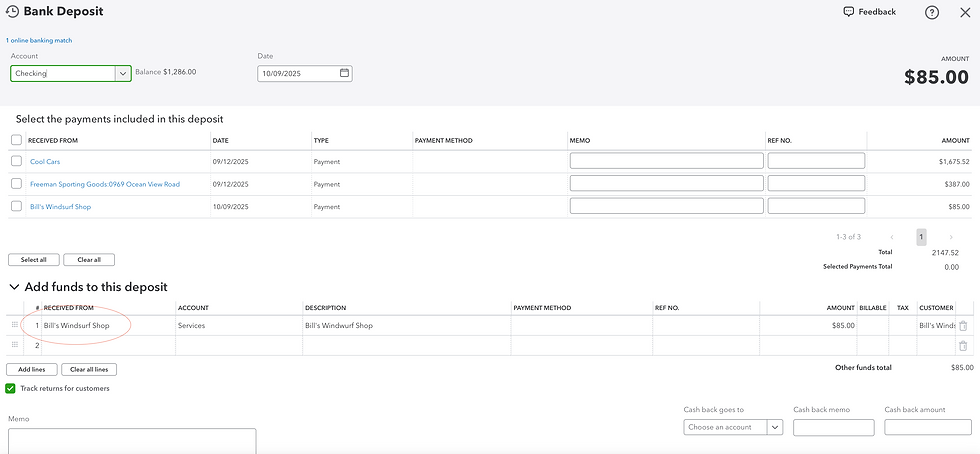
You'll notice there is now another entry at the top of the screen for the same vendor, Bill's Windsurf Shop.

Simply check the box next to the vendor at the TOP of the screen, and delete the row on the bottom of the screen, keeping the deposit total the same.

And that's all there is to it! Your invoice is now properly matched to the bank deposit, and the reconciliation wasn't touched.
If tasks like these are too complicated for you, or if you simply don't have the time to tackle these kinds of in-depth Quickbooks issues, give us a call! We love to help small business owners where we can.


